Apple Ads is a powerful tool for promoting apps in the App Store. However, even experienced advertisers often make mistakes that reduce campaign efficiency and lead to overspending.
Below, we’ll explore the most common mistakes, their consequences, and how to fix them.
The most common mistakes
Lack of Competitive and Market Demand Analysis
Understanding your main competitors, the search terms users use, and the problems they’re trying to solve is crucial. Without this insight, your budget may be spent on ads that fail to attract attention or stand out among other brands.
Consequences:
Irrelevant traffic — ads appear for non-targeted search terms; potential users don’t install the app or delete it shortly after.
Low conversion — the ads don’t match the real interests of your audience.
Losing to competitors — other brands better adapt their Apple Ads campaigns to user needs.
Budget loss — money is spent on clicks that bring no results.
How to fix it:
Research competitors — check who is advertising for your target keywords.
Study market demand — gather the most popular search terms in your category and filter out overly generic keywords; they’re usually expensive and rarely bring quality installs.
Identify your app’s unique advantages — clarify why users should choose your app and make this the foundation of your ad messaging.
Test and optimize — review key metrics regularly, remove underperforming keywords, and experiment with new ad variations.
Relying Only on Search Match as the Main Source of Keywords
Search Match is an automatic targeting mode where Apple determines which keywords to use for showing your ads. Relying solely on this mode can result in ads being shown for irrelevant terms.
Consequences:
Budget loss due to showing ads to a non-target audience.
Lower conversion rate (CR).
Higher cost per install (CPI).
How to fix it:
Use manual keyword targeting.
Combine Exact Match and Broad Match for better efficiency.
Incorrect Campaign Structure
Many advertisers create a single campaign and add all keywords into it. This leads to chaos and uncontrollable spending.
Consequences:
Budget spent on ineffective search terms.
Difficult to track advertising performance.
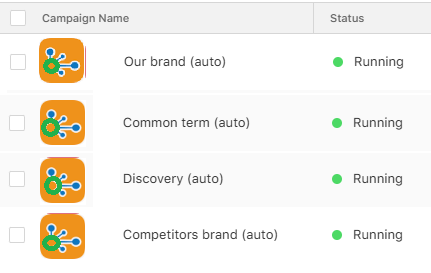
How to fix it: Break your ads into specific, clearly defined campaigns:
Our brand — keywords containing the name of your app.
Competitors brand — names of competing apps.
Common terms — general terms related to your category.
Discovery — a campaign designed to find new keywords.
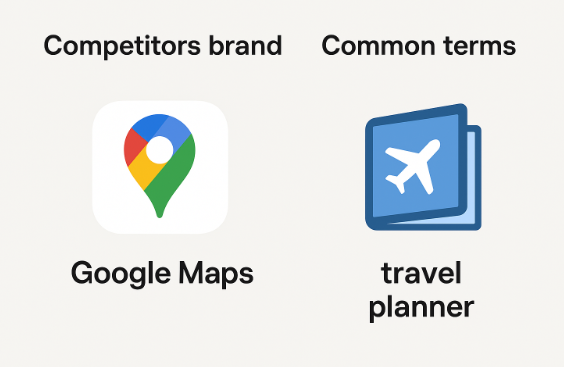
Example: If you have a travel app, the term “Google Maps” belongs in the Competitors’ brand campaign, while “travel planner” fits under Common terms.
Ignoring Branded Campaigns and Branded Terms
Sometimes advertisers do not separate branded terms into a dedicated campaign or avoid running defensive ads altogether, assuming their app already ranks high organically.
Branded activity helps retain traffic, control install costs, and prevent competitors from appearing for your branded keywords.
Consequences:
You cannot see how many installs come specifically from branded terms.
Loss of control over the budget and bids for branded keywords.
Competitors may intercept your traffic by targeting your brand.
Hard to manage bids for branded and generic traffic within a single campaign.
Inefficient budget allocation increases CPI.
How to fix it:
Create a separate campaign for all search terms containing your app’s name.
Use Exact Match to maintain full control over bids.
Run brand-defensive campaigns to manage traffic and prevent losing potential users.
Expand your semantic coverage — include Broad Match, common misspellings of your brand, and related terms.
Allocate sufficient budget to ensure the campaign gets enough impressions to stay competitive.
Analyze performance regularly — review results, optimize bids, and add new keywords to maintain efficiency.
Focusing the Budget on a Limited Number of Keywords
Advertisers often spend the majority of their budget on just a select few keywords — mostly branded or generic terms. This approach limits growth and makes campaigns dependent on a narrow pool of search terms.
Consequences:
Campaigns become overly dependent on a small set of keywords.
Higher risk of sudden CPI increases due to competitive pressure.
Missed opportunities for scaling and reaching new audience segments.
How to fix it:
Expand your semantics using Discovery campaigns.
Add new relevant search terms and test them on a wide sample.
Use Exact Match to control the performance of newly added keywords.
Gradually move high-performing terms into separate groups for more precise bid optimization.
Overbidding in Brand Protection Campaigns
This approach quickly drives up spending: you may continue winning most auctions, but you’ll pay unnecessarily high prices. Additionally, brand ads can cannibalize organic traffic — users searching for your app by name may click on ads instead of organic results, causing you to pay for installs that would have happened anyway.
Consequences:
Inflated CPI and overspending.
Organic cannibalization — paying for installs that would have occurred without ads.
How to fix it:
Set reasonable bid limits for branded terms based on acceptable CPI or CPA.
Analyze the share of organic vs. paid installs for branded search terms to assess and manage the level of cannibalization.
Incorrect Choice of Keywords
Selecting terms that do not accurately reflect the app’s content or core functionality can lead to irrelevant ad impressions.
Consequences:
Reduced campaign efficiency due to ads being shown to the wrong audience.
Wasted budget on taps that do not convert.
How to fix it:
Choose keywords that clearly reflect the app’s features and benefits.
Regularly review and update your keyword list to reflect changes in your app or the market.
Failing to Exclude Negative Keywords
Without excluding irrelevant search terms, ads may appear for unrelated searches and reach an untargeted audience.
Consequences:
Spending on non-targeted taps.
Reduced campaign relevance and effectiveness.
How to fix it:
Use Negative Terms to filter out irrelevant terms.
Regularly analyze the Search Term Report and add unnecessary search terms to your exclusion list.
Using the Same Keywords in Broad Match and as Negative in Exact Match
Adding a keyword in Broad Match while simultaneously listing it as a negative Exact Match creates conflicts that can prevent your ads from serving correctly.
Consequences:
Ads are blocked because irrelevant terms prevent them from showing.
Valuable traffic is lost.
Statistics are distorted — the campaign may appear ineffective due to configuration conflicts.
How to fix it:
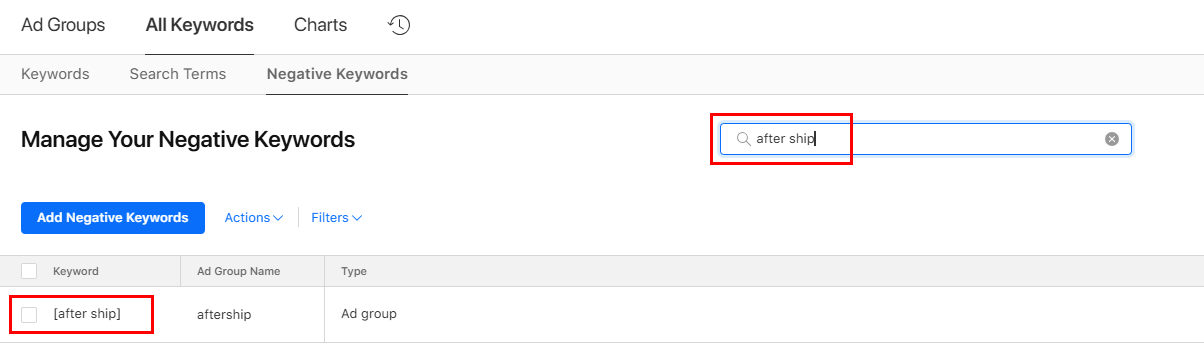
Check for duplicate keywords in negative lists at both the campaign and ad group levels to avoid conflicts.
Remove negative terms that match or are similar to active keywords in Broad or Exact Match.
Use negative terms only for irrelevant keywords, not to control traffic between match types.
Review the Search Term Report a few days after changes to ensure your desired keywords are being served.
For example, for a paid app, you can add “free” as a negative term to avoid spending budget on users looking for free alternatives.
Turning off Keywords Too Quickly
Gathering sufficient statistics takes time and enough clicks. Pausing a keyword too early may cause you to lose potentially profitable search terms that only required optimization.
Consequences:
Premature pausing reduces the number of effective search terms and limits scaling.
Potentially profitable search terms may be lost before their performance is fully revealed.
The campaign becomes dependent on a small number of stable search terms.
How to fix it:
Reduce bids instead of pausing. Almost any search term can become profitable with the right bid level.
Set an upper bid limit based on your target CPI and conversion rate (CR).
Periodically review results since CR may change over time, and a certain search term can become more effective.
Using Terms Without Checking Current SAP (Search Ads Popularity)
Previously, the SAP (Search Ads Popularity) metric allowed advertisers to estimate search frequency in the App Store and identify high-potential keywords.
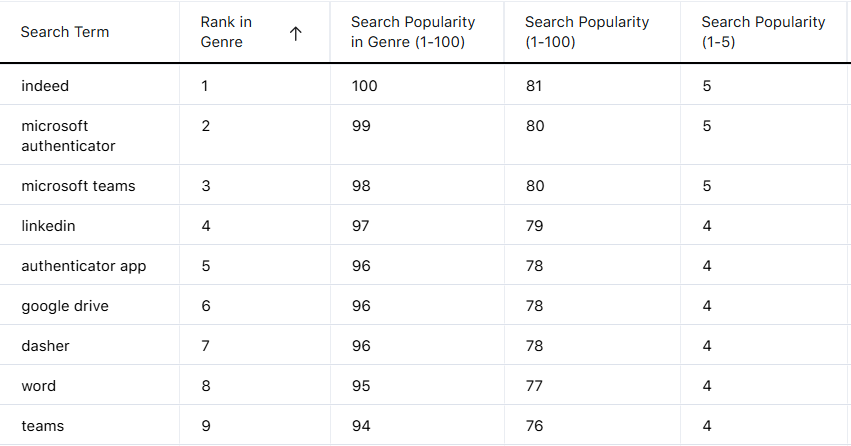
In October 2025, Apple updated how this information is displayed. Previously, only dot indicators appeared in the advertising account, while exact numerical values were available via third-party ASO tools.
After the update, Apple introduced a Monthly Search Term Rank Report showing SAP for high-frequency keywords. Meanwhile, third-party tools lost access to detailed SAP values, no longer providing a complete view of term popularity.
As a result, it has become more difficult for advertisers to distinguish between high-traffic terms and low-popularity ones.
Consequences:
Minimum impressions — the campaign receives little to no traffic due to low term popularity.
Wasted budget — active keywords fail to generate installs.
Missed opportunities — resources are spent on low-demand search terms instead of medium- and high-frequency keywords.
How to fix it:
Use the Monthly Search Term Rank Report in Apple Ads or third-party tools to assess term popularity.
Focus on terms with real impressions.
Regularly analyze the report, replacing low-TTR or zero-impression search terms with ones that reliably generate taps and installs.
Not Tracking Terms with Punctuation or Mixed Languages
In Apple Ads, keywords containing punctuation or mixed languages (e.g., English and Chinese) often show low SAP, even when they are relevant.
Consequences:
Ignoring these search terms can lead to losing potential users who search with similar combinations.
A significant portion of your target audience may be overlooked.
How to fix it:
Consider all possible spellings, including punctuation and mixed-language search terms.
Add these search terms to campaigns and track their performance, even if SAP is low.
To avoid irrelevant impressions, also include negative keywords for similar search terms that don’t match your audience.
Incorrect Bid Settings (CPT Bidding)
Bidding too high or too low directly affects ad impressions and spending.
Consequences:
Overbidding — rapid budget depletion without an optimal number of installs.
Underbidding — ads barely appear, resulting in few installs.
How to fix it:
Use CPT with optimal bids — focus on cost per conversion and ROAS.
Test different bid levels and analyze results.
Not Optimizing Bids for Different Keywords
Setting the same bid for all terms without considering their individual performance can lead to inefficient spending and missed opportunities.
Consequences:
Overpaying for less effective keywords while missing out on traffic from high-performing ones.
How to fix it:
Analyze the performance of each keyword and adjust bids based on their results.
Daily Budget Cap Too Low
The Daily Cap limits daily campaign spending. If set too low, the campaign may exhaust its budget early, causing ads to stop showing.
Consequences:
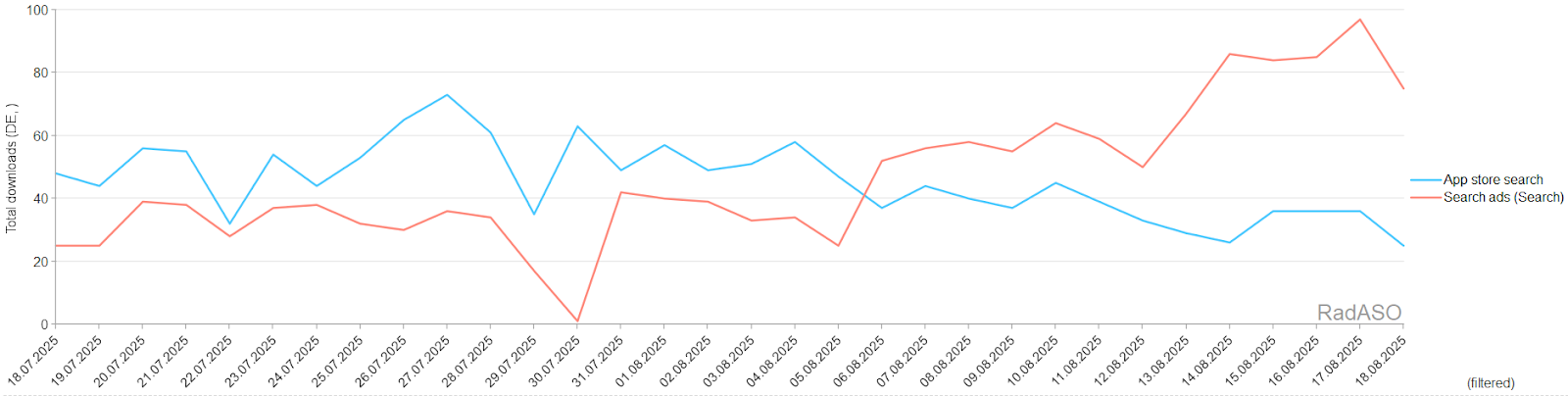
Loss of peak impressions and traffic; the campaign “stops” while competitors continue running.
Distorted analytics — data may appear stable, but ads aren’t active for part of the day.
Uneven budget distribution.
How to fix it:
Check average daily spend. If the Daily Cap equals or is below this, the limit is too strict.
Increase the daily budget by 20–30% above average to cover peak hours.
Regularly review the cap after changes to bids, keywords, or seasonal traffic patterns.
Not Tracking ROAS / TTR (Tap-Through Rate)
ROAS shows the revenue generated per $1 spent on ads. TTR indicates ad clickability in Apple Ads.
Many advertisers focus only on CPI, ignoring ROAS and TTR. This can result in cheap installs that don’t generate profit or in misjudging overall campaign effectiveness.
Consequences:
Uncertainty about whether ads are generating revenue.
High CPI doesn’t always indicate losses — revenue per install must be assessed.
Low TTR may signal ad or creative irrelevance.
How to fix it:
Track ROAS via analytics platforms (e.g., AppsFlyer, Adjust) to assess profitability per keyword or term group.
Optimize TTR — test different creatives, screenshots, and ad copy.
Evaluate performance holistically — consider the entire user journey from click to purchase, not just CPI.
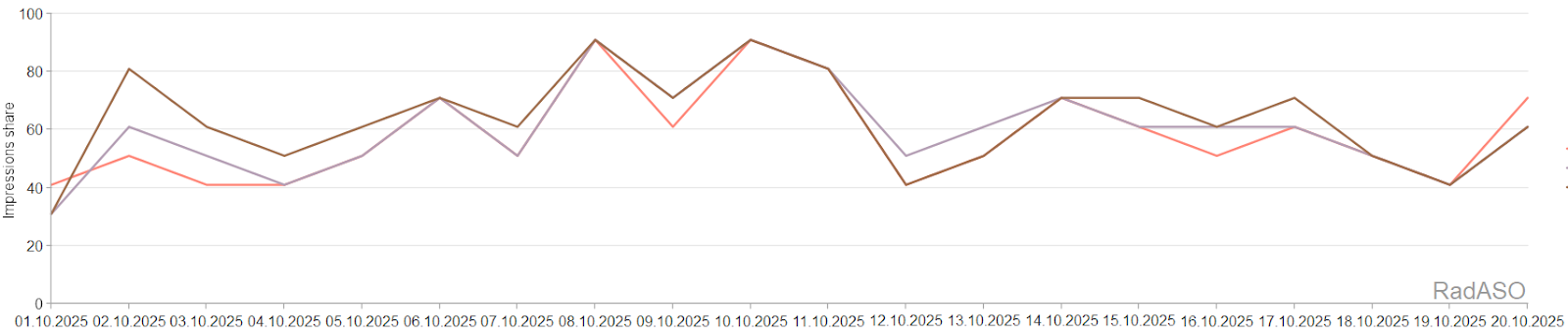
Not Monitoring Impression Share (IS) Daily
IS shows the percentage of total potential impressions your ads are receiving. Without regular monitoring, campaigns can silently lose visibility.
Consequences:
Reduced visibility in search results.
Decreased traffic, installs, or conversions.
Delayed optimization decisions — problems may only become apparent after results decline.
How to fix it:
Monitor IS trends regularly via Apple Ads reports.
Investigate drops to determine whether they are caused by budget limits or ranking issues.
Adjust bids and budgets when IS falls due to competition or insufficient funding.
Lack of Analytics
Failing to track essential metrics — conversions, LTV, ROAS, and TTR — leads to a distorted view of campaign performance.
Consequences:
Impossible to identify campaigns with positive ROI.
Wasted budget on irrelevant traffic.
Lack of data for bid adjustments or campaign optimization.
How to fix it:
Use an MMP (Mobile Measurement Partner) or SKAdNetwork to collect accurate data.
Track the user lifecycle — LTV, Retention Rate, ROAS.
Regularly analyze the Search Term Report to optimize keywords.
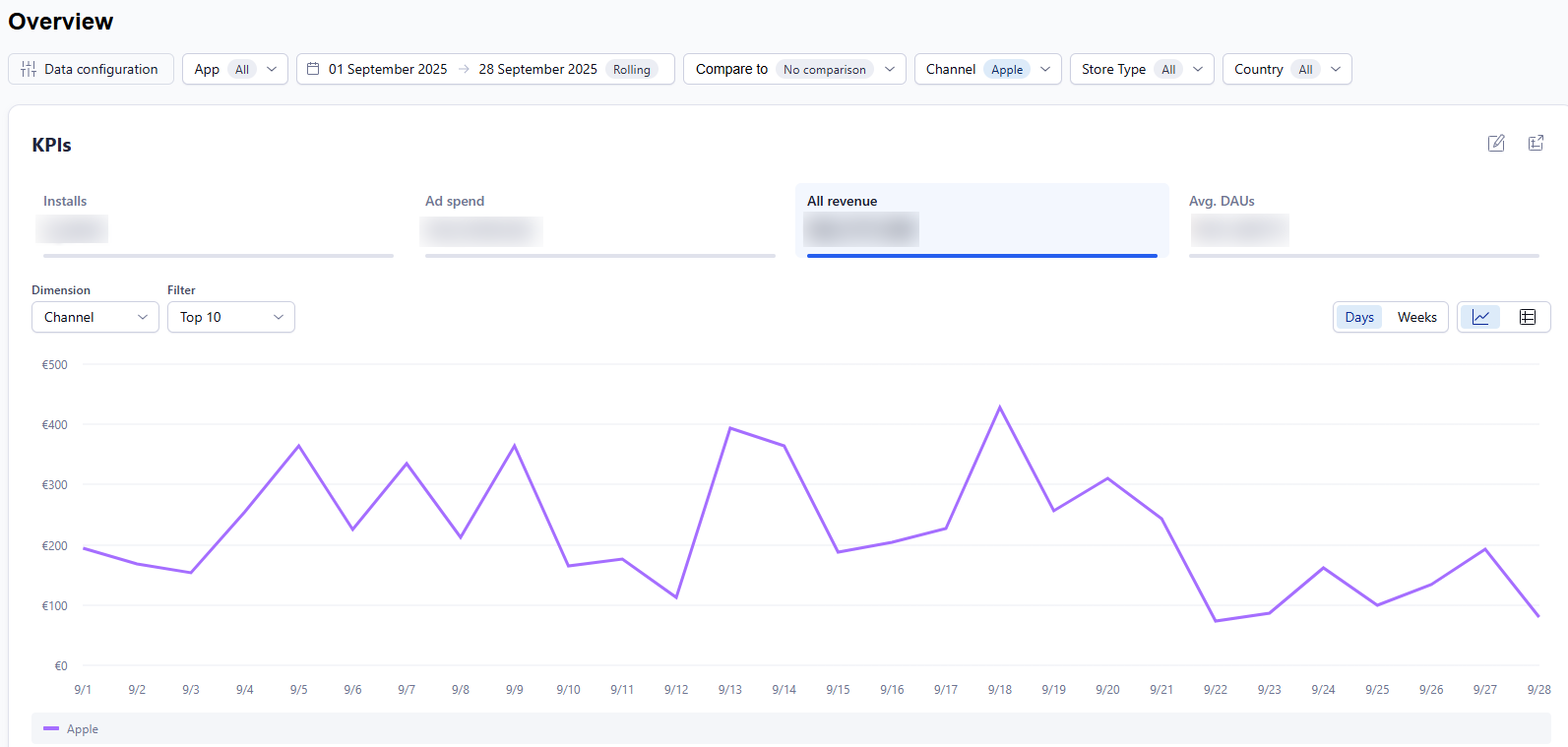
The graph from Adjust shows the KPI — campaign revenue.
Data Mismatch Between Apple Ads and Analytics Platforms (Mmps)
Installs and performance metrics in Apple Ads often differ from data in third-party analytics platforms like Adjust or AppsFlyer. This is due to differing attribution models: Apple uses its own SKAdNetwork and LAT (Limit Ad Tracking) approach, while MMPs rely on their own tracking methods.
Consequences:
Incorrect ROI/ROAS assessment.
Optimization decisions based on inaccurate data.
Premature pausing of profitable keywords or targeting regions.
How to fix it:
Compare data from both sources and understand the differences in attribution.
Use SKAdNetwork as the reference for Apple Ads and MMPs for more detailed insights.
Explain attribution differences to clients to avoid misinterpretation.
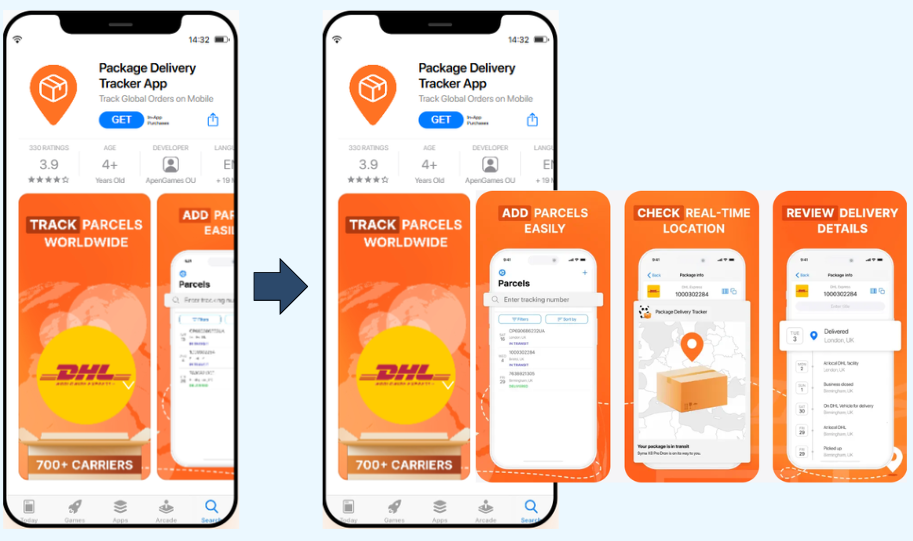
Not Using Custom Product Pages (CPP)
Apple allows creating Custom Product Pages for different audiences, yet many advertisers rely solely on the default page.
Consequences:
Low conversion rates due to a mismatch between ads and the landing page.
Lost potential users who may not find relevant content.
How to fix it:
Create CPPs with unique content tailored to each ad group.
Use A/B testing to identify the most effective page versions.
Ranking Cannibalization
This occurs when Apple Ads impressions overlap with organic search results. High-ranking apps may see paid installs cannibalizing what would have been organic installs.
Consequences:
Wasted budget — paying for installs that would have occurred organically.
Excessive self-competition — higher bids reduce ad efficiency.
How to fix it:
Run branded campaigns selectively — only for search terms where competitors are advertising on your brand.
Analyze overlap between Apple Ads and ASO — reduce bids or pause ads for high-organic terms.
Use SKAdNetwork and MMPs to measure Apple Ads’ true impact on organic installs.
Not targeting local search terms used by native users.
Ignoring cultural and language nuances.
Using universal creatives for all markets without adaptation.
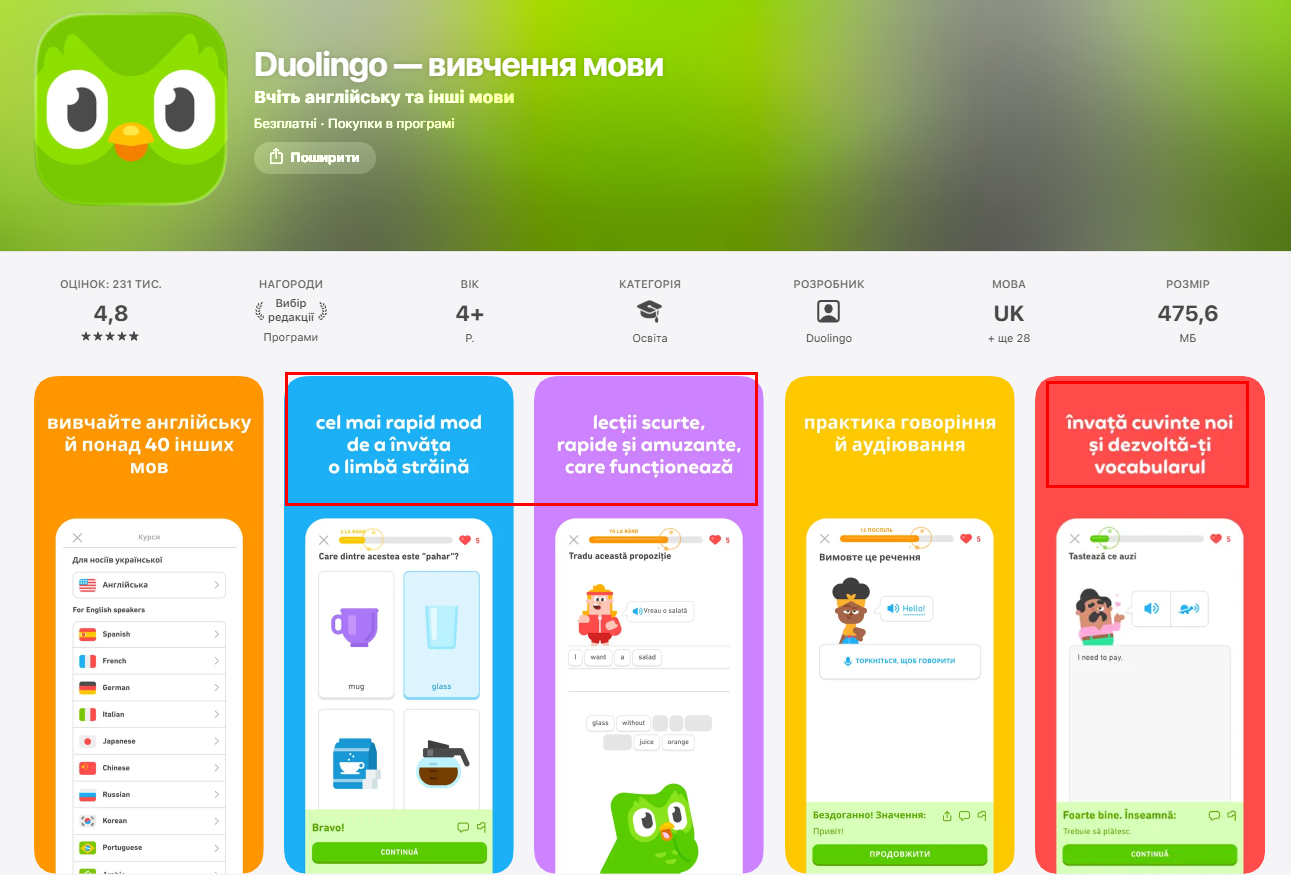
Examples of bad localization: the second, third, and fifth screenshots are not translated.
Consequences:
Ads appear unnatural or unclear to local users.
Brand communication seems low-quality or untrustworthy.
Lost taps and high CPI due to low engagement.
Insufficient reach due to irrelevant or unpopular search terms.
How to fix it:
Work with native speakers or professional translators to review and refine all localized texts and ad copy.
Test multiple localized versions — headlines, descriptions, visuals, and color schemes adapted for each market.
Use local keyword research tools that provide market-specific data with country or region filters.
Analyze actual search terms in Apple Ads reports and adjust your campaigns accordingly.
Study local competitors to understand regional communication styles and adapt yours to fit user expectations.
Set up Custom Product Pages (CPPs) to create tailored pages for each market.
Launching Apple Ads in Unsupported Countries
Some countries have their own App Store (e.g., Lithuania), but Apple Ads is not supported. Users in these regions can download the app organically, yet these countries do not appear in the list of locations available for Apple Ads campaigns.
Consequences:
Inability to launch campaigns in unsupported countries.
Wasted setup time and budget planning risks.
How to fix it:
Verify the list of Apple Ads supported countries and target available markets only.
Ignoring Fallback Locales
In some countries (for example, the Dominican Republic, Iraq, or Slovenia), App Store Connect does not provide a dedicated locale. In these cases, the app is displayed using a fallback locale — typically English (US) or English (UK). As a result, both the default product page and any Custom Product Pages (CPPs) will appear in English, regardless of the developer’s preferred localization settings.
Consequences:
Lower conversion rates due to a mismatch between the user’s language and the page content.
An invalid semantic core — non-English keywords will not trigger ads.
Wasted budget on campaigns targeting audiences that cannot see localized content.
How to fix it:
Check available target locales in App Store Connect before launching campaigns.
Prepare product pages and Apple Ads assets in English when working with fallback locales.
Collect semantic search terms in English.
Separate fallback-locale countries in reporting to ensure realistic expectations and clearer performance analysis.
Ignoring Apple Ads Rules and Updates
Apple regularly updates its rules, introduces new features, and adjusts algorithms. Ignoring these changes increases the risk of policy violations and puts you at a competitive disadvantage.
Consequences:
Ad rejection — causing campaigns to fail and wasting time.
Loss of effectiveness, as competitors adopt new features and you fall behind.
Analytics inaccuracies when important settings or policy changes are overlooked.
Stay in the loop regarding news from MMPs and through industry sources and communities (Discord: ASO Busters, Twitter: Apple Search Ads, LinkedIn: SearchAds.com).
Adapt campaigns to new algorithms — test bids, optimize analytics.
Expecting High TTR in Search Tab Ads and Today Tab Ads
In Search Tab Ads and Today Tab Ads formats, the TTR (Tap-Through Rate) is typically lower than in standard search campaigns. Users see ads in these App Store tabs but often do not intend to interact with them immediately, resulting in fewer taps.
Many advertisers compare the TTR of Search Tab Ads and Today Tab Ads with standard search campaigns, where users are actively searching for an app. This often leads to the mistaken perception that low TTR indicates poor performance, causing them to prematurely pause campaigns that are actually effective.
Consequences:
Campaigns with low TTR are often paused prematurely, even if they generate installs and revenue.
A portion of the audience never reaches the install stage, although repeated impressions could have converted them.
Overall app visibility in the App Store declines, as Today Tab Ads and Search Tab Ads serve as brand advertising that builds awareness.
How to fix it:
Evaluate campaigns based on CPI, conversion rate (CR), and retention rate, not just TTR.
Test different visuals to improve user engagement.
Targeting by Age and Gender
Apple Ads settings allow you to set restrictions based on age and gender. But in practice, this often hurts campaign performance. Many users do not share personal data in their Apple ID, so Apple Ads automatically excludes anyone without this information. This results in a significantly narrower audience than intended.
Consequences:
Significant audience narrowing, as users without specified age or gender are automatically excluded.
Distorted analytics — campaigns may appear ineffective due to artificially limited reach.
How to fix it:
Avoid age/gender restrictions.
Optimize campaigns using keywords, CPPs, and CR/CPI analysis.
Insufficient ASO Before Apple Ads Launch
Many Apple Ads campaigns are launched before completing proper ASO work. As a result, metadata — including the app title, description, keywords, and visuals (icon, screenshots) — in App Store Connect may not align with the ad. Users may click the ad (resulting in high CTR), but upon visiting the app page, they don’t find what they expected, leading to a low conversion rate (CR).
Consequences:
Low CR despite good CTR.
Increased CPI.
Wasted advertising budget.
How to fix it:
Conduct a full ASO audit before launching campaigns.
Optimize metadata — title, subtitle, description, and keywords.
Update visuals — screenshots and app icon that reinforce ad messaging.
Use Custom Product Pages (CPPs) to align the ad experience with the app page.
Ignoring Country-Specific Apple Ads Legal Requirements
Apple Ads enforces specific regulatory requirements in certain countries that go beyond the platform’s standard settings.
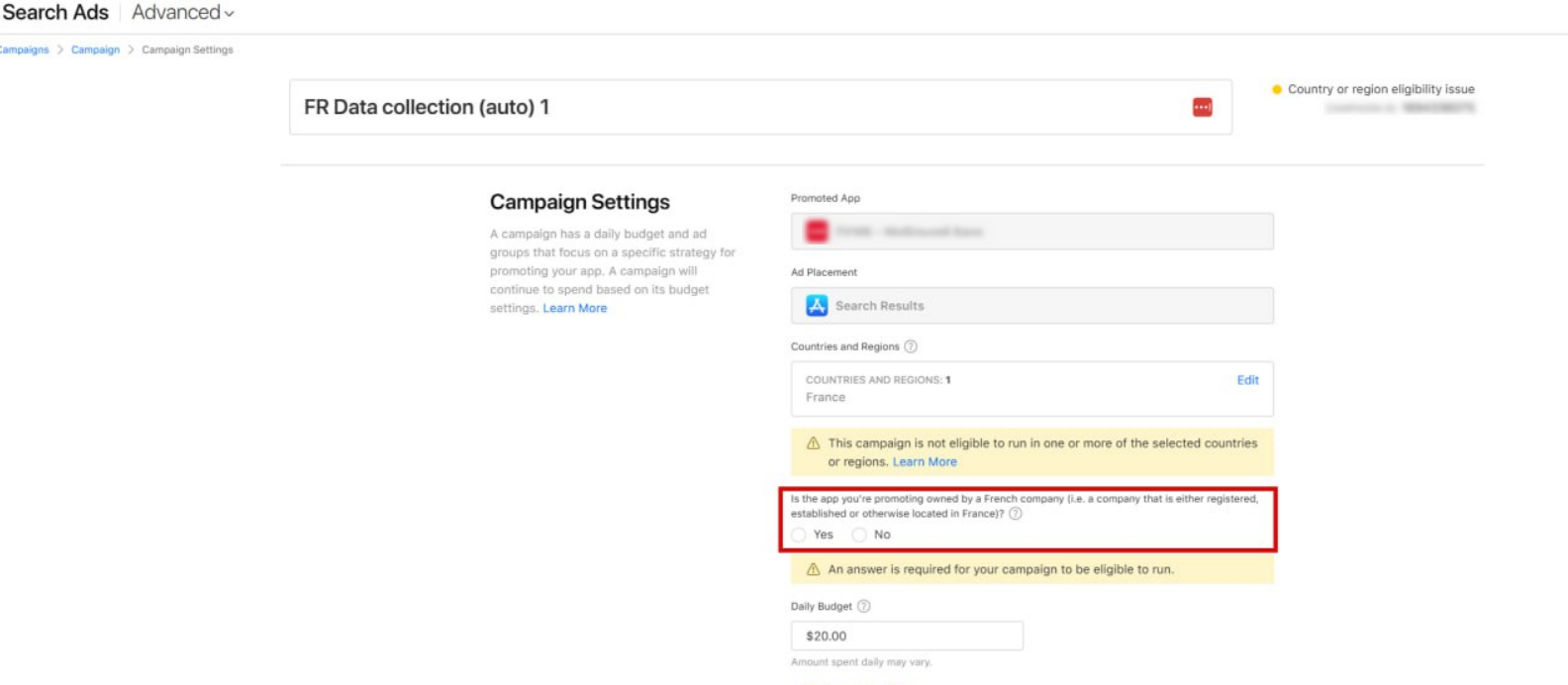
In France, advertising is regulated by the Sapin II law, which requires advertisers to ensure transparency and compliance with local regulations. When creating a campaign targeting France in Apple Ads, a special checkbox appears to confirm adherence to these requirements. If this checkbox is not selected, the campaign will not run and will remain in a Not Running status.
In mainland China, campaigns require additional legal approval. Advertisers must upload business documents, such as licenses, permits, or other proof of activity. Campaigns will not run without prior approval.
For more information about launching ads in China, see Apple’s official guide.
Consequences:
Campaigns will not start, even if all other settings are correct.
Time wasted on official inquiries as to why the ad is not running.
How to fix it:
Check local legal requirements before launching campaigns.
Follow Apple Ads prompts and instructions for regions with special regulations.








.avif)