

Entering new markets goes far beyond simply translating the interface; it requires deep adaptation of the product to local user expectations. In practice, even strong products can lose organic traffic and user loyalty due to small but critical issues such as unnatural wording, incorrect date or currency formats, or an inappropriate communication tone.
The result is a loss of user trust and increased audience churn after the first session.
In this article, I will explain how to build an effective localization process for iOS and Android that allows you to enter new markets with confidence and increase conversion in app stores.

There’s a common misconception that having an English-language version automatically makes a product international. In reality, this alone isn’t enough to establish genuine connection with local audiences.
To successfully enter new markets, translating the interface alone doesn’t quite cut it; you need comprehensive localization of both the product and its pages on Google Play and the Apple App Store.
Localization is the process of adapting a mobile application to the cultural, linguistic, and technical characteristics of a specific region. It accounts for interface style, usability patterns, local date and currency formats, and even the appropriate tone of communication.
This approach helps establish an emotional connection with users, attract more organic traffic, and significantly increase conversion rates.
A study by CSA Research showed that:
These figures confirm that high-quality localization of Android and iOS apps is a critical component of any global growth strategy.
Localization becomes important once a product has gained traction and captured the target audience’s attention. When launching a global project, it’s not necessary to immediately invest heavily in translating into dozens of languages. Instead, a gradual scaling strategy tends to be more effective.
Move in iterations: first, translate the app for markets with the greatest potential, and then refine the localization for markets that require a more tailored, individual approach.
Start by adapting your app pages on Google Play and the App Store, and optimizing metadata. These pages are users’ first point of contact with your product, so they should immediately “speak” to them in a language they understand.
Metadata localization covers three key aspects:
The next step is to properly upload the prepared data to the app stores and ensure that users in each region see the correctly localized version.
The App Store supports 39 locales, providing flexibility in selecting languages and shaping your localization strategy.
To add, remove, or update text or visual metadata, you need to release the app to the store.
Learn more about preparing metadata and promoting iOS apps
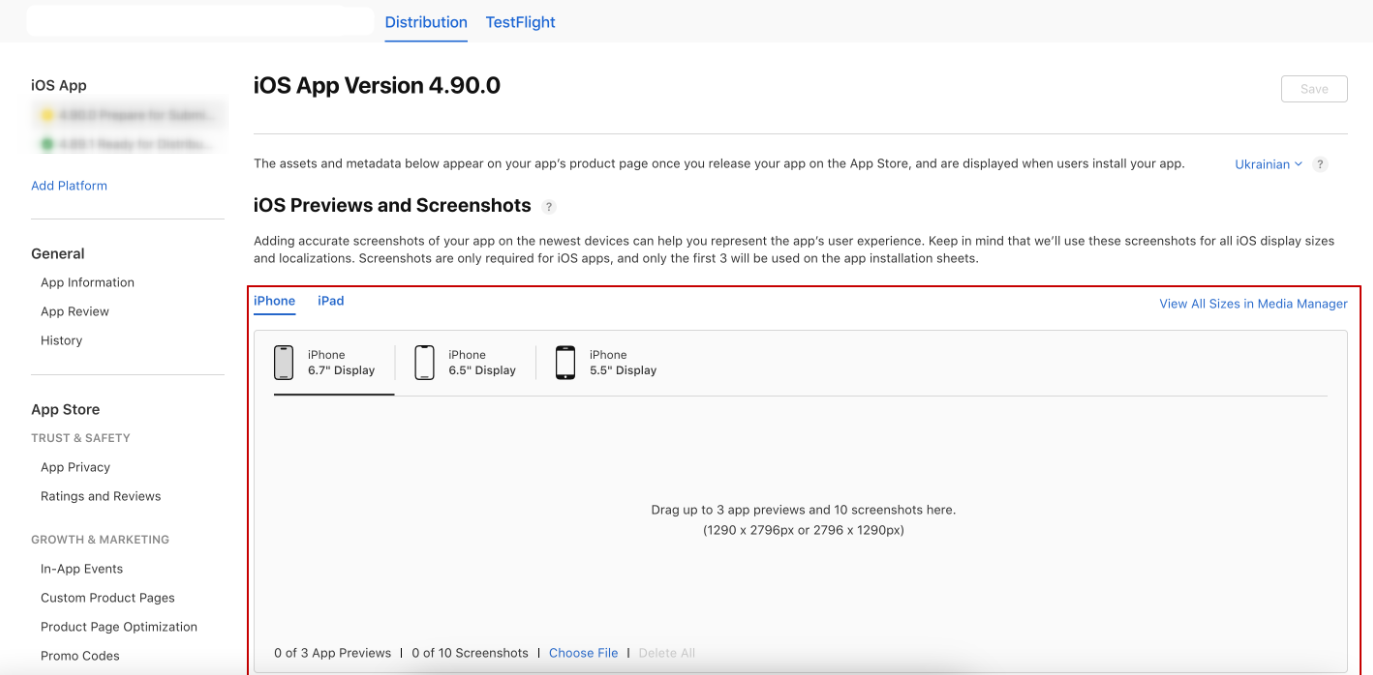
Next, I will explore how to manage metadata using App Store Connect, Apple’s web platform for app management in the App Store.
1. Click on the My App icon in App Store Connect.
2. In the sidebar on the left side of the screen, go to the General section, select App Information, and choose the base language from the drop-down list on the right.
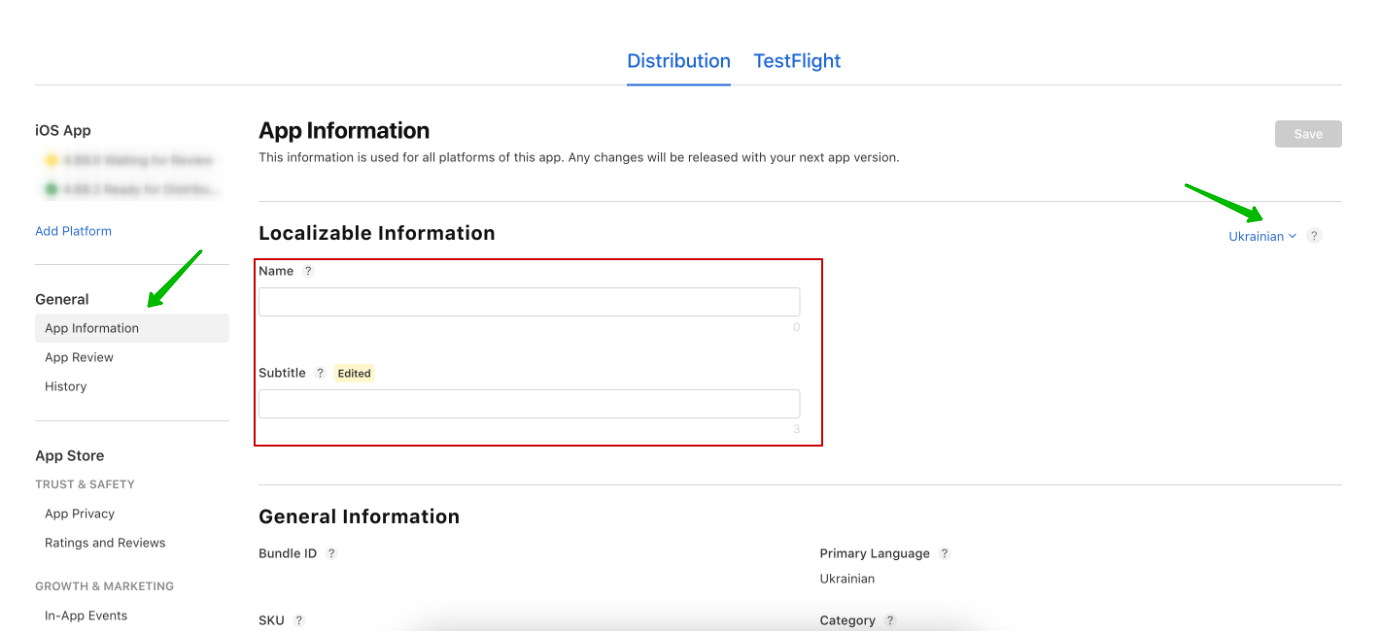
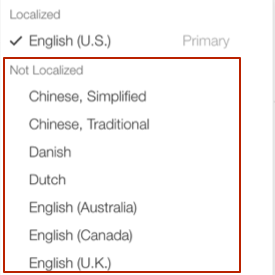
3. Select the desired languages from the “Not Localized” list, then fill in the Name and Subtitle fields.
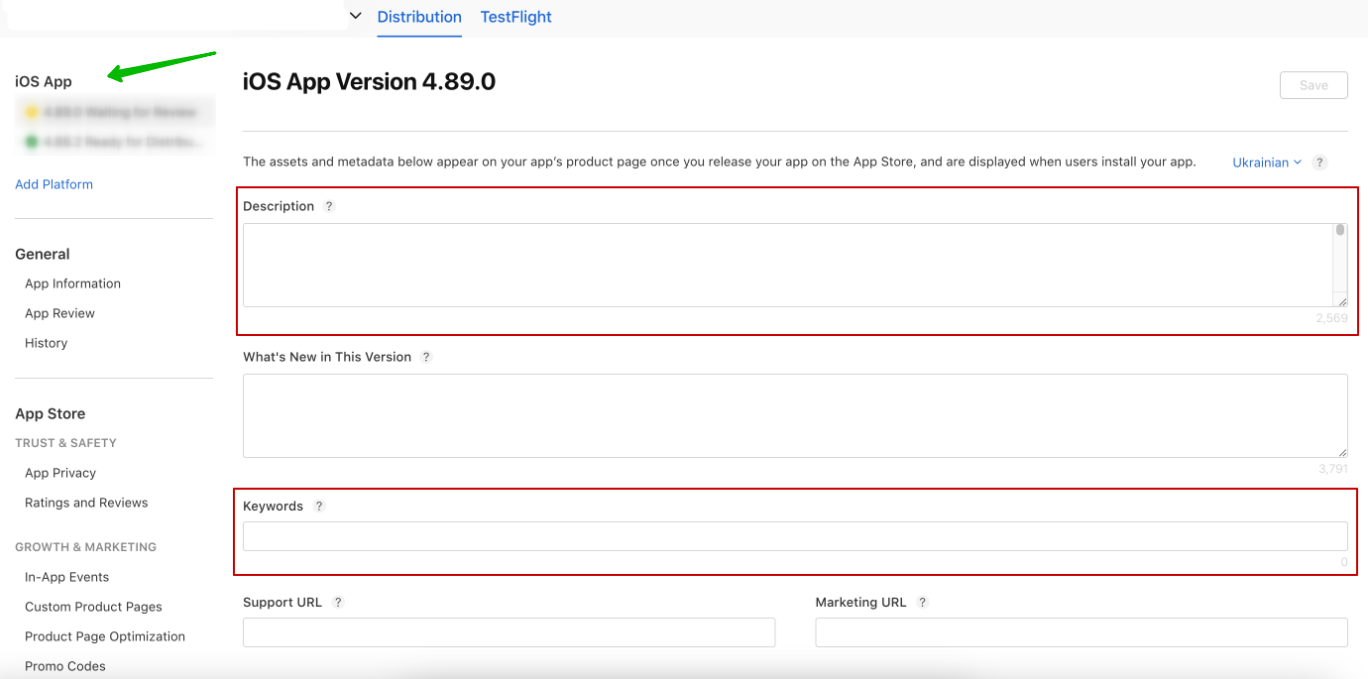
4. In the new release version, add localized text metadata — description and keyword list — to the appropriate fields.
5. You can also add visual metadata in the same section.
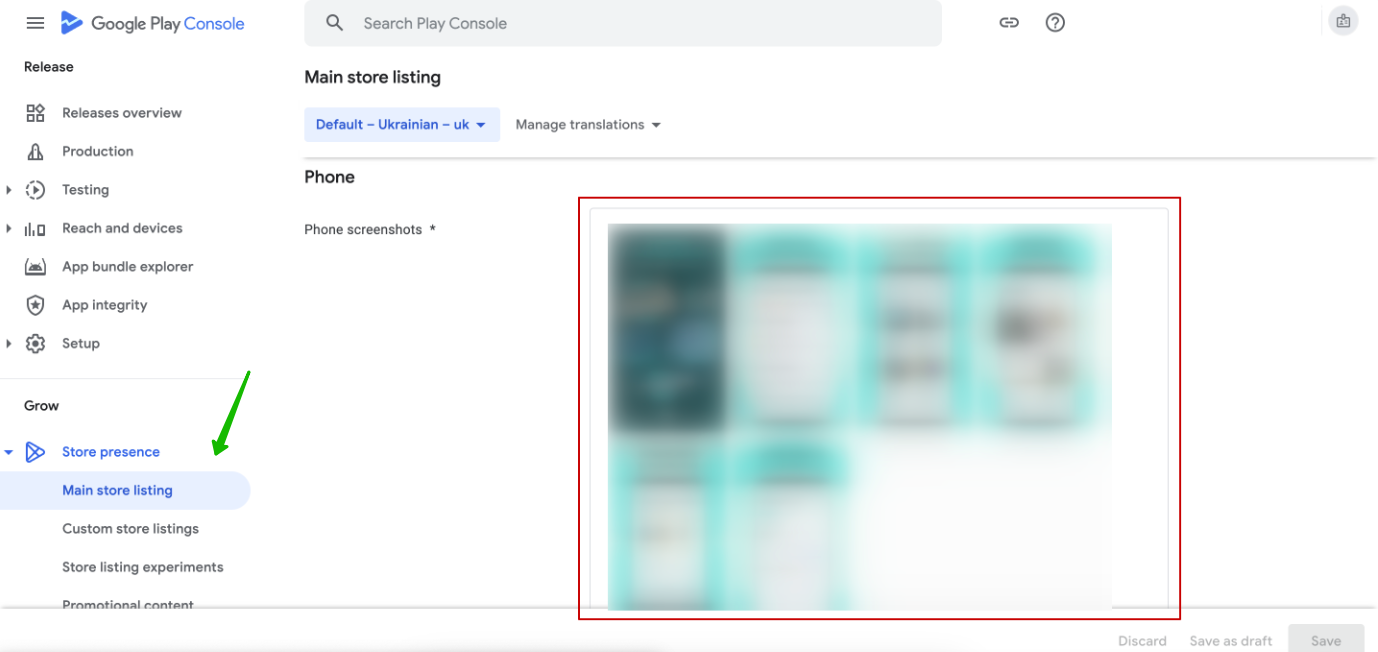
Localization and adding new locales on Google Play follows a similar process to the App Store:
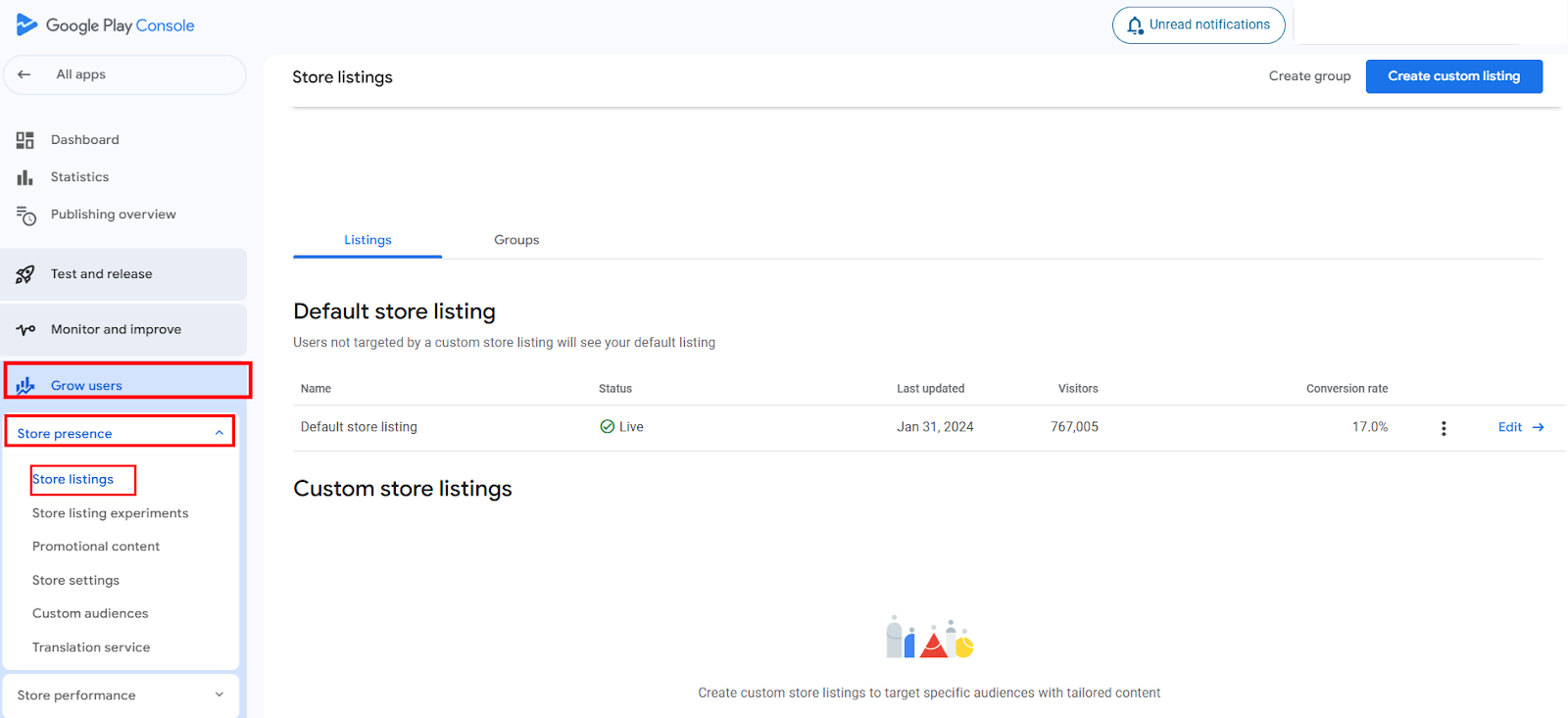
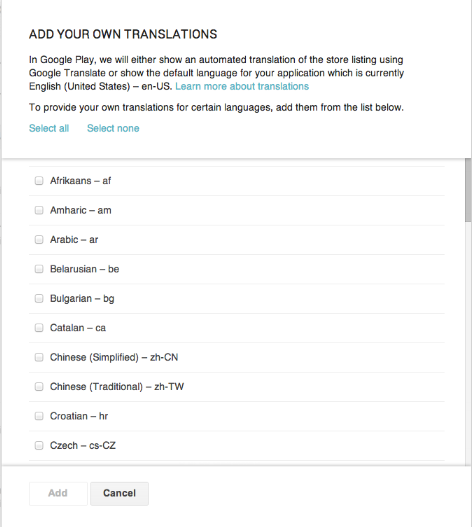
Google Play provides two ways to localize text metadata:
1. Automatic translation via Google Translate
2. Manual entry for each locale
Automatic translation is a quick solution if professional translation isn’t available. However, it often contains inaccuracies, ignores cultural nuances, and has a noticeable “machine-translated” feel. To native speakers, this text can appear sloppy, undermining trust in the product and negatively affecting its perception.
Guide to promoting your mobile app on Google Play
Effective product adaptation starts not with translation, but with proper project architecture during development. The key process in this stage is internationalization.
Internationalization is the technical process of preparing an application to support multiple languages. It involves storing all text, date formats, numbers, and currencies separately from the program code. This approach makes it easy to add new languages or update existing ones without affecting the core logic of the product.
High-quality internationalization provides three key advantages:
This approach makes the localization process transparent, manageable, and significantly more cost-effective in the long run.
In the past, localizing mobile products was an entirely manual and time-consuming process: each key/value pair had to be copied into Excel, sent to a translator, and then manually reintegrated into the code. While this might be manageable for a single language, scaling to twenty or more languages often led to chaos, errors, and unnecessary costs. Today, technology has streamlined and optimized these processes.
Today, localization for Android and iOS apps is handled through specialized platforms: LMS (Localization Management System) and TMS (Translation Management System).
The most popular solutions include Crowdin, Lokalise, Smartcat, and Phrase.
These cloud-based platforms support multiple file formats and integrate with tools such as GitHub, Figma, Slack, and more.
Localization files are uploaded to the system, allowing translators to work directly with ready-made keys and texts without manual copying. This simplifies the translation process, accelerates updates, and enables quick checks of localization within the interface context.
As a result, the team operates more efficiently, and the risk of errors and code loss is significantly reduced.
Modern localization systems increasingly leverage AI to generate translation suggestions. While this speeds up the process, it cannot yet replace professional linguists:
The most effective approach today is MTPE (Machine Translation Post-Editing). AI generates a draft translation, which is then reviewed and corrected by a professional translator to ensure accuracy and a natural, fluent tone.
This prevents your app from appearing unprofessional or “machine-translated,” such as the examples below:


Localization begins with analyzing your project and selecting target markets for expansion. Start by localizing your app pages on Google Play and the App Store. Analyze the results, then identify which parts of the interface require translation.
Keep multilingual countries in mind. For example:
To avoid inconsistencies, create a glossary for your app. This is a list of key terms that must be used consistently across the interface, including button names, functions, currencies, actions, and more.
Additionally, develop a style guide that defines rules for user communication, graphic style, punctuation (such as which quotation marks to use), and other important details.
Ensure your app architecture is prepared for dynamic content changes. Buttons, text fields, and other UI elements should be flexible to accommodate variations in text length. For example, a German translation may be 30% longer than the English original, while some Asian languages may be more compact.
Export resource files in the appropriate formats — .strings or .xliff for iOS, .xml for Android. During translation, it is essential to preserve technical symbols, variables, and formatting to avoid disrupting the app’s logic.
Once the final translations are ready, move on to integration and final verification.
For high-quality localization, hire professional translators who are native speakers. Integrate the translated files into the project and perform thorough testing. Ensure that:
Interface localization is a strategic step for any project with global potential. It ensures that users immediately understand the value of your product and feel comfortable in its digital environment, regardless of their country or language.





.avif)